

Hi,I know there are some concerns that we are no longer supporting the Blackmagic Cinema Camera or Pocket Cinema Camera. I just want to assure you that this is not the case.
Let me give you some background information about the development and why it is taking longer than expected.
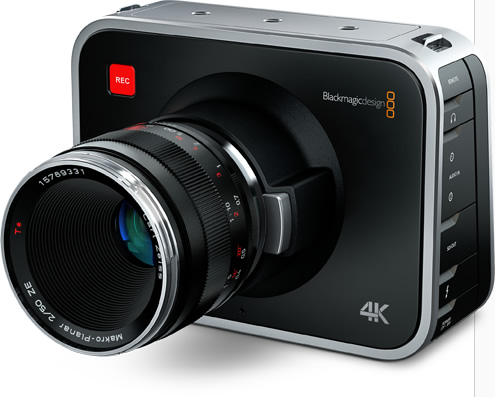
The Blackmagic Cinema Camera was our very first foray into cameras and since then, we have shipped 3 more cameras, the Pocket Cinema Camera, Production 4K and the Studio Camera.
The original 2.5K camera had fundamental architectural differences in firmware compared to the other cameras which doubled the effort when trying to do any bug fixes or add new features to the cameras. As such, we knew we had to re-architect the firmware so as to bring it up to speed with the current cameras. This is not simple and taking longer than we thought. However, we are close now, close enough that beta versions have been seeded to some users for the past few months.
We should be able to see an update, as I’d mentioned in my post, to the 2.5K camera and Pocket Cinema Camera soon with the features below:
1. New debayering for shooting directly to ProRes or DNxHD on the Blackmagic Cinema Camera EF and MFT
2. Improved MFT lens support on the Pocket Cinema Camera
3. Compressed RAW support on the Production Camera 4K
4. Autofocus support for EF lenses on Blackmagic Cinema Camera EF and Production Camera 4K
What is also in this release are also certain hooks that are required for audio level metering and histogram display. It won’t be visible as yet but will allow us to quickly followup with an update to add these 2 tools we know you guys are asking for.
Let me also answer some other questions I’ve been asked below:
• Formatting of media
Yes, we want to do this. A large part of the work has been completed so I don’t believe this will be a big effort to implement. However, it is very unlikely that we will support deleting of clips directly in camera due to the risk of media fragmentation.
• Time Remaining indicator
Yes, this is going to happen. It’s probably in the next update or an update after.
• Black Sun effect
This is a fundamental characteristic of CMOS sensors. Some sensors have additional circuitry to try and overcome this and this was available in the Pocket Cinema Camera. Unfortunately, it is not in the 2.5K sensor. Also, black sun correct circuitry is also not an on/off switch and with some sensors, it may result in other unwanted artefacts so we have to be really careful about it. Another method of overcoming the black sun effect is via image processing after the image has been acquired and passed on from the sensor. This is basically running an algorithm to try and detect what looks like the black sun and just clipping the black areas. Again, this could result in false positives and if you have a pattern in the image that is similar to the black sun, it could mistakenly be “corrected” as well. As you can see, this is a tricky situation. We are not ignoring it, but working to see what is the best way to address this.
I hope this gives you more information about what we’re currently up to. I’m tempted to keep this thread locked as it tends to go off topic but I’ll leave it open for now. Please try and keep on topic.
Thanks
Follow me on Twitter @eriknaso and check out my page on Facebook.
Thanks for coming by! Please help support my site by using the links on this page or bookmark these from my favorite retailers, B&H, Adorama, Zacuto, Amazon.com & Think Tank Photo. Using the links cost you nothing extra, but it helps offset the cost of running my blog. Thanks again for coming by eriknaso.com!
[adsenseyu1]
