

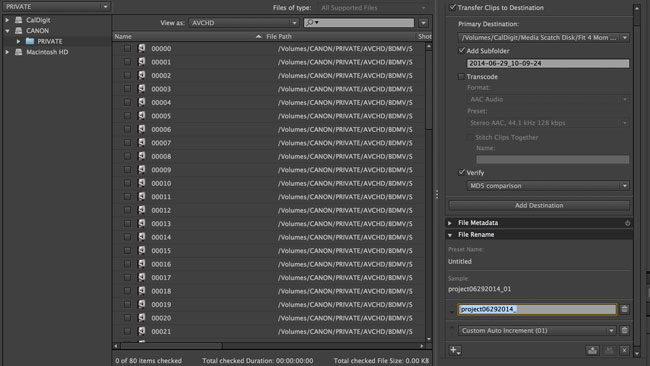

How many times have you got screwed by the AVCHD naming convention. It’s one of the biggest complaints I have with the C100 and any other camera that uses AVCHD. The format isn’t for pros, but that didn’t stop camera manufacturers from putting it in high end cameras.
Renaming all the the clips Using Adobe Prelude CC 20114 is the best. With AVCHD every new media card has the exact same naming convention. 00000.MTS then 00001.MTS. If you have more than one media card and the project goes offline it can be a pain to figure out what card it came from. Having a solid folder naming structure helps too. With Prelude CC I choose. “Custom Name” and “Custom Increment” Now every clip will have a short project name followed by date and clip number like this. project06292014 _01 And so on. Now send to Premiere Pro and the new clip names follow.
This isnt going to change the actual file naming on the card. If that was the case I would be even more excited! Make sure you keep your project organized with folders. Here is how I do this.
- In media scratch I always have a clear folder name for each card. If your cards are mixed up with diffrent shoots use Prelude to seperate them. Makes life easier.
- In premiere Pro use the same folder names as you gave to that cards media. This way relinking will be much easier.
Try it out next time you have a AVCHD project.
Now that you can customize your AVCHD cards what naming convention do you use? How do you organize. Share those tips!
Follow me on Twitter @eriknaso and check out my page on Facebook.
Thanks for coming by! Please help support my site by using the links on this page or bookmark these from my favorite retailers, B&H, Adorama, Zacuto, Amazon.com & Think Tank Photo. Using the links cost you nothing extra, but it helps offset the cost of running my blog. Thanks again for coming by eriknaso.com!


I use Better Finder Rename, a neat little $20 soft, very powerful, flexible, and simple to use (http://www.publicspace.net/ABetterFinderRename/), For Mac or Windows.
For renaming my files, 2 letters for the subject, date, clip, and number. Using underscore to assure compatibility between systems and soft. For example for my last documentery, God’s Daughters, A renamed file would look like; GD_20140205_ordination_01 which tells me the project is God’s Daughters, shot Feb 05 2014, clip #1, scene is the ordination.
Another think I like with this soft is that it works with any kind of file. And super fast.
Nice Luc!
Are you shooting with AVCHD? If so how does the file structure change on the original structure of the card?
Pretty much what Bill does. Rename, rewrap. I first transfer everything to a hard drive. leave me the card as a safety net until everything is renamed and rewrapped.
L.
Incredibly and annoyingly, though, Adobe didn’t even include the most elementary of custom renaming variables like the time stamp of the file. So we cannot rename files to distinguish between those taken on the same day but at different times of day, using a new filename. The forums are lit up with complaints about this but Adobe has ignored it for over a year.
Hey Erik,
I really like the Canon C100 and a few other cameras that rely on the AVCHD codec. I too, dislike maintaining the AVCHD file structure. The trick for me has been long clips for interviews or presentations. When you pull the .MTS files out, and try to stick them together in software, you get audio and video dropouts at the seams.
Jonah Kessel over at newshooter.com pointed me to ClipWrap by Divergent Media. It’s inexpensive and very helpful. ClipWrap will either transcode the footage for you or just rewrap your AVCHD footage into .mov containers, making your clips viewable in Quicktime. It will also handle file spanning automatically. Once I rewrap my footage I also use ABetterFinderRename to rename my footage.
Thanks for your work on this blog, Erik. I appreciate your insights.
Good stuff Bill. Thanks for sharing.
Naturally, anything that transcodes already-highly-lossy footage like AVCHD is a total non-starter.