

During the month of July I’ve been shooting and editing news breaks that play in the Ellen show These are usually done with studio cameras and crew but they are in training with a new control room setup so I’m doing them for now. I could use a typical ENG camera but come on! Thats no fun right?
These have a vert tight turnaround. I shot and edit them in less than an hour. No lighting just the lights in the grid that are set for this painfully ugly video wall. More on that.
I used the A7s and RODE Lavalier plugged direct into the camera. I’ve been experimenting with different profiles and so far the ones I like most are CINE2 and Pro. The image isn’t overy flat like Slog2 and the saturation isn’t as low either. Pro Color Node has a nice rich but no punchy look. I don’t have to add saturation in the edit. Colorista II is amazing. I shoot and edit these Ellen topicals everyday and turn them around in less than an hour. I’m using the Sony A7s and RODE Lavalier plugged direct into the camera. Works great.
Check this out.
Click on the images to make them bigger.

I mentioned the horrible video wall earlier. This is the problem. The lighting in that position is 3500K and the LCD screens don’t match that temp so they get this green tint in the whites.
To fix this I used the Keyer in Colorista II. It’s so easy even I can do this in a quick turn environment. All you have to do is drag the mouse over the area that you want to change. This is much easier when the color is the same with little variations but even then it’s doable. As you can see I have a few variants in the screen. I also added in the blue parts too.
The top image is the finished look. The bottom left is the original un ungraded source. The bottom right shows the key. Whats white is the area that I will be able to change. The black stays the same. Very much like doing a green screen key.
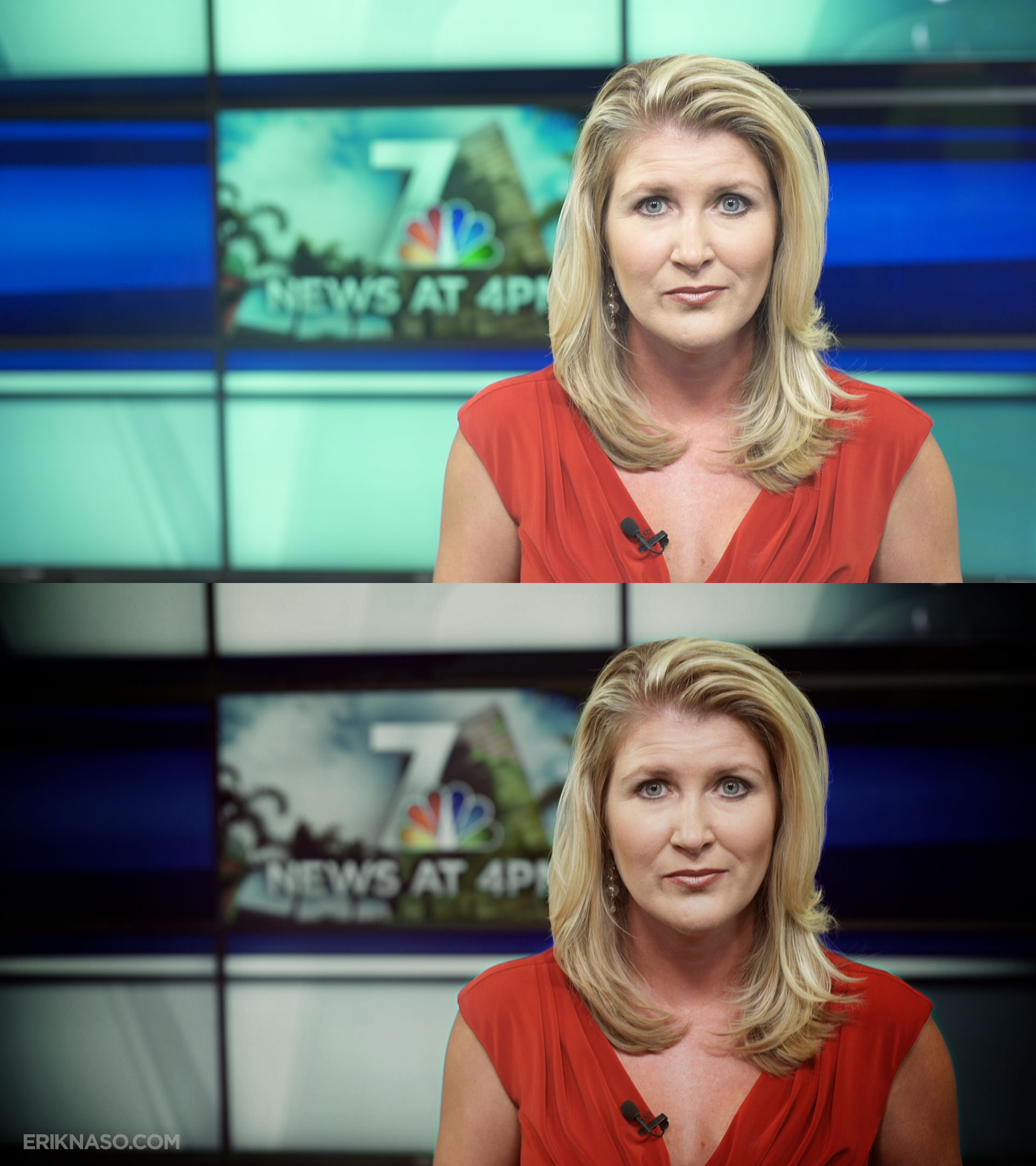
Here is the before and after. I like it!. Below is a sample of the topicals.
Want to learn more about the A7s? Check out my hands on review.
I will even will tell you what Drives Me Crazy About the A7s.
Follow me on Twitter @eriknaso and check out my page on Facebook.
Thanks for coming by! Please help support my site by using the links on this page or bookmark these from my favorite retailers, B&H, Adorama, Zacuto, Amazon.com & Think Tank Photo. Using the links cost you nothing extra, but it helps offset the cost of running my blog. Thanks again for coming by eriknaso.com!

Hey Erik,
Interesting! I recently shot some GH4 footage with Cine like D, and I had no idea what I was in for, man what a shock.
The flat image just doesn’t do well with skin tones, granted, I really don’t know what I’m doing with a flat image, so I take that into account, but I can’t say it was a good first experience. I should also state, I graded this footage in FCPX, which in all likelihood didn’t help.
Looking at your screen grabs, to me these look hot. like they are right on the clip line, if not above it. And, that is kinda what I experienced with my GH4 footage, in that, i just has this over-all hot look to it that I hate. Again, it’s a lot of not knowing what the hell i’m doing with that kind of image, i’m sure!
Sometimes log like footage makes skin look greenish. You have to have practice grading that kind of footage. Also it’s not good to always shoot really flat. In good lighting it isn’t necessary. In high contrast scenes thats when it shines.
The anchor to me wears makeup thats to light for studio lights. See her arms and neck area? Much better color. I exposed the shot with the highlights under 95 IRE and brought it down a little in the grade.
I’ll definitely keep that in mind. I’m sticking with Cine like V for this camera, much more user friendly! And that is a great point, if you have no experience grading a flat image, think twice about using Cine like D.
Now that you mention it, her left arm looks tanned and her right isn’t, like she hung her arm out the car window on a sunny day and got an uneven sun tan.
Lots of experimenting to do with this GH4.
Nice grade Erik, looks natural. How do they deal with that green tint on the video wall with the studio cameras?