


UPDATED: Feb 17 2015
I finally had some down time and took Presidents day to go shoot with the replacement nebula 4000. As you read this article you will learn the original one was defective and I spent a lot of time just trying to get it to work. Now I have the one Dave Dugdale used for his review. Big thanks to Dave for setting that up. I decided to go to the Mission and test out the Nebula 4000 Lite in the Fig Rig. It’s just much easier for me to control while it’s installed in it. I shot for around two hours on and off. Basically arriving at 2pm and wrapped up around closing time around 4:30pm. Funny I was the last person to leave 😀 Here is a little sample.
UPDATE Feb 24 2015
Here is the test video I shot at the Mission San Diego de Alcalá with the Nebula 4000 Lite. I used my Fig Rig and it really helped in two ways. First I feel it takes the bounce of walking out a little more and second I have much better control of the gimbal and allowed for some nice moves. It was fatiguing using this thing for two hours. I must be out of shape! but the Fig Rig also helped distribute the weight better. I did find that after a while shooting without the rig my wrist and forearm got tired fast. I used the GH4 with the Lumix 7-14. (Love that lens!) on the Nebula 4000. I did try the 12-35 but I really liked the look of the wide angle. Brings in so much more and the gardens and Mission are pretty tight so having the wider field of view is great. One thing that was a little disappointing is the GH4 in low light conditions. Inside the Mission I had to go to ISO 1600 with the F4 7-14. The noise was pretty bad in the shadows. I used Red Giant Denoiser II on several of the shots. That worked fairly well.
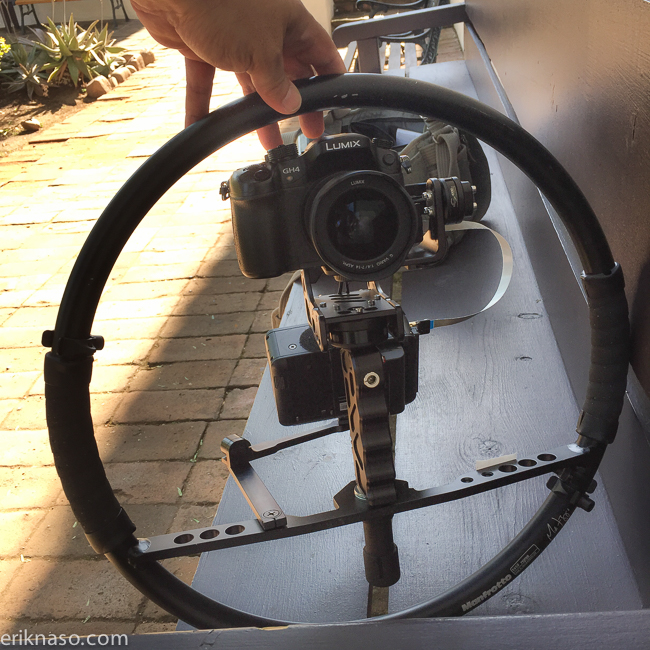
Here is the setup. I also used the Atomos Ninja Blade and a ribbon cable to help frame up the shots. The monitor is mounted on the excellent Xtender friction arm.
Back to the original review.
I received my review unit late Friday and Saturday started to balance my A7s on the gimbal. The only other handheld gimbal I’ve used is the DJI Ronin so I’m not a gimbal pro in any way.
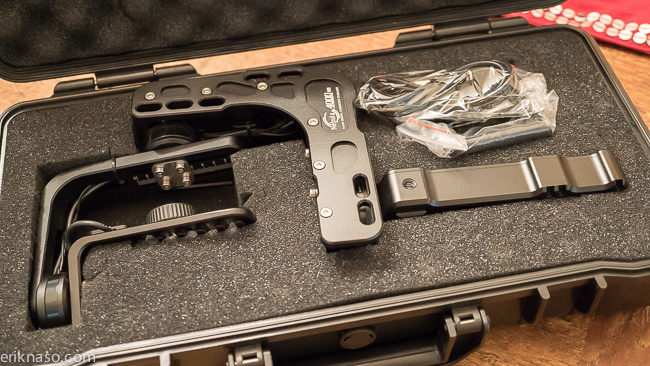
The gimbal comes in a nice hard plastic case with pull and pluck foam. Included is a iPhone holder, AC power supply and allen wrench.
I did a rough balance and walked around the house with the A7s and was impressed with the Nebula 4000 Lite. It had a few quirks still but I can see how cool this tool is and can’t wait to fine tune it. It really is impressive. The Nebula 4000 Lite is so small. Traveling with it will be a breeze and the price is also very good at $699.
UPDATED 12-23
After playing with it around the house it dawned on me that it might fit inside of a Fig Rig. I love my Fig Rig! It’s the original affordable camera stabilizer and if it could work I bet the bumps could be smoothed out and give the operator two points of contact for even better performance. Here is a little video I did to show how it works.
I believe you could do a DIY project and get the same results so if you don’t have or want to invest in a Fig Rig something similar would do the job.
I had to add a few 3/8 thick washers to get the Nebula 4000 Lite to mount. The thread inside the gimbals grip isn’t deep enough. What a difference having it in the Fig Rig. Feels lighter because I can hold it with both hands and now have much better control of the pan and tilt. Okay back to the original overview.
The build is great. Like a tank and has a tactical look too that I like. No plastic here. It’s all metal but not heavy. Here is a pretty good sample of the Nebula 4000 Lite in action.
The 3 axis Nebula 4000 Lite requires a little more work to get it balanced than the Ronin does and It takes some patience to get it perfect. I say perfect because it has to be. If the camera is off just a tad it won’t work right. Balance is the key. With 3 axis’s you have to tune all of them and it requires an allen wrench and several small screws. It takes a few tries to get it right. They recommend to only loosen not remove the screws. Good call! It would be very difficult to get them back in. The camera sled doesn’t require a allen wrench. I’ll go further into this in the video when I get to shooting. Balancing wasn’t to hard.
The instructions that come with the Nebula 4000 Lite are lacking. Very small print with small fuzzy pictures showing how to balance. This video below is how I learned how to balance a camera. It’s a long one so I created chapter marks to make following along much faster. When you click the timecode the video will open on YouTube. I wish I could embed it better. Sorry. If you hover over the timeline you can go to the listed times too. I also left a comment on Youtube so you can also use that to jump to the chapter you need.
6:07 Roll Balance
10:00 Pan Balance
13:32 Switch Modes
16:10 Sensor Calibration
17:57 Android Tuning & Remote
35:31 PC Mac Bluetooth Lnk
40:41 Mounting Monitor And Extend
52:50 Mounting GoPro
With the Nebula 4000 Lite to fine tune the gimbal a universal piece of software has to be used on a PC or Mac. It’s not as easy to use and could get you in trouble if you mess with it too much. Will you need to use the PID software? I think so.
UPDATED 12-22-2014
I spoke to Filmpower today and they say that the PID software isn’t a must and comes from the factory tuned for easy operation. I think they are right. I was having issues with my review unit getting it to talk to the software and we tried it with Bluetooth and USB. I thought I needed to tone down the motors.
I was having roll balance issues and Filmpower walked me through a few things to check. The issue was a cable that comes from the ROLL sensor was hitting the frame causing it to knock it off balance. Once I cinched it up it worked perfectly. Now my A7s with Sony 35mm 2.8 is smooth as butter.
For my review I wont be able to use the software but as I stated I might not need to if I keep the camera weight in the right zone. Still need to test other lenses and the GH4 too.
The program or PID software is called SimpleBGC GUI V2.40 B7. When you go to the linked page the version you need is titled nebula_PC_Mac_Linux.zip This is the tool for tuning.
I’m going to leave this part about how to install the software and the drivers for people that might be interested. It’s not a requirement only an option that should be used if you are having bigger issues. Best to get familiar with the Nebula 4000 Lite first before jumping into the software.
After you unzip the file you get a folder with a bunch of stuff inside. For PC users you have it a little easier. Just double click on SimpleBGC_GUI.exe to launch the program. I believe when you plug the Nebula 4000 to your PC a driver will automatically be installed and connection will be easy.
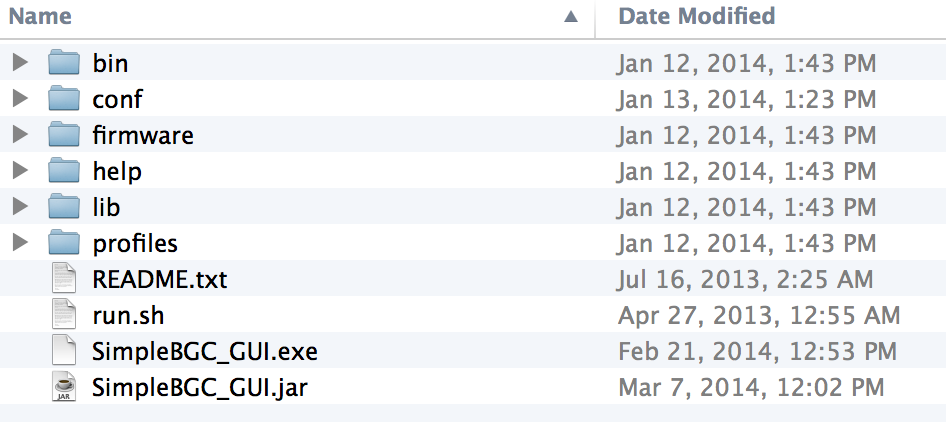
Below is what the software looks like.

I’m on a mac and that makes it a little more complicated.
If you are too open the Readme file and get ready to use Terminal to get things working. Here is the instructions.
MAC OS users: GUI uses a serial communication, that needs to create a lock file.
To allow it, you should to do the following steps:
1. Start terminal (navigate to /Applications/Utilities and double click on Terminal)
2. Make folder “/var/lock” by command: sudo mkdir /var/lock
3. Change permissions by command: sudo chmod 777 /var/lock
4. Allow to run non-signed applications in System Preferences > Security & Privacy >
General > Allow Applications downloaded from: Anywhere (see http://d.pr/i/9fAm )
To use USB connect you will probably need to download a driver from HERE. Then choose the Mac version or click the link to download. Download VCP (832 KB)
This is all the stuff I have to play with over the next few days and I’m having some issues connecting to the software on my Macbook Pro Retina so I have some troubleshooting to do. Actually I need to kick my son off his gaming computer and try that out 😀 My review unit doesn’t work with the software to do any tweaking so I wont be able to review that portion of the Nebula 4000 Lite.
One thing I have noticed is the stock motor settings are pretty good. That’s a big deal because I had to do a lot of fine tuning with the Ronin to get heavy vibration issues fixed. The simple non-software adjustments fixed some of this and I will go over that in the video.
The battery does seem to die pretty fast and the Nebula 4000 Lite doesn’t give you any warning before it goes limp. I dont have an exact time yet but I have been using it a lot and when the unit isn’t balanced well the motors have to work harder and that draws a lot of juice from the battery.
UPDATED 12-27-2014
I need to point out a few things that aren’t so good.
1st. My unit came to me with a cable that bulged out on the roll arm and was rubbing on the frame causing it to not balanced correctly. I had to pull it tight.
2nd. I couldn’t use the software. Something is wrong with the board that won’t allow any PID or tweaks of any kind.
3rd. The battery dies very quickly. I’m testing this part now. I took the Nebula out to the Nixon Library the day after Christmas and it died in 2 minutes. I had the Nebula 4000 fully charged two days earlier.
I’m going to retest for the battery issue but again I did notice while testing that it didn’t seem to last very long.
I did a retest. I got two minutes and thirty seconds of use and it goes limp and starts acting really unstable. I decided to take the battery plate off and see if something came loose. I didn’t notice anything that stood out. I also took the bottom cover off but I really don’t know anything about electronic boards and circuits and again didn’t see anything obviously wrong. After I put it all back together I recharged it and got 22 minutes of continuous use before it died. Very odd.
Unfortunately my testing is over unless I can get another unit to use. Mine is clearly defective. Filmpower has been very helpful and responsive to the issues I’ve had and I’m sending it back to them to fix. Hopefully I will get it back so I can finish with a video sample. At this point I cant take it out and run the gimbal for more than 22 minutes continuously. I have heard from other users that they are getting around two hours of use. Thats pretty impressive battery life.
For now my final thoughts.
The Nebula 4000 Lite is an innovative tool that strips away the frame and puts the gimbal in the palm of your hand. If you use it correctly by not trying to move too fast you can get amazing results. It does have a tendency to bounce if you walk to fast but then again so does the bigger ones on the market. practice and plan your shots and you will get great results.
If you have a Fig Rig or other pieces of kit laying around for a DIY approach you can take out a lot more of the walking bounce. Adding that second point of contact really helps stabilize the gimbal and also makes it easier to use since you don’t have to hold it with one hand.
Mine was a lemon. No doubt about it and it happens with all products. Maybe it was put together on Friday at 4:45pm. Who knows. It failed on several levels and so it’s hard for me to recommend because of that. On the other hand Dave and several others that have the Nebula 4000 Lite haven’t experienced any issues at all. The software works and battery life is as expected. In fact they love this thing! I would really like to get another one to test out and use. I really had very little time before the review unit stopped working. It didn’t completely die but yes the battery issue was keeping me from taking it out for a day of shooting. The tests I did do around the house impressed me. What little time I had I enjoyed and see how cool this could be as a production tool and this is the first generation. I’m sure we will see improvements. I want to stress how good the settings are out of the box for amuture filmmakers that dont want to go too deep into PID software. With a good balance setup you will get good results. With tweaking it could be amazing.
Dave Dugdale on the other hand is having great success with his copy as well as several others I have spoke to and I’m looking forward to seeing his footage and review coming soon.
Dave Dugdale is also playing with the Nebula 4000 Lite so take a look at his progress and follow us along as we figure out how to get the most from the Nebula 4000

Follow me on Twitter @eriknaso and check out my page on Facebook.
Thanks for coming by! Please help support my site by using the links on this page or bookmark these from my favorite retailers, B&H, Adorama, Zacuto, Amazon.com & Think Tank Photo. Using the links cost you nothing extra, but it helps offset the cost of running my blog. Thanks again for coming by eriknaso.com!


Looks like a good find Erik. Thankyou. I’ll be following tho one closely. Might be a great solution for those of us that need to work fast… Hopefully.
[…] Erik Naso Check out Erik’s blog post as he starts to set it up […]
Thanks for linking to my site, I updated my post and added your link so my audience can watch us both “stumble” through all the settings. 🙂
We have a lot of work ahead of us!
The software sounds INTENSE! I wonder if you have to setup different profiles for different lenses.
It could be. Movi and Ronin have very easy apps and software. I think Filmpower will develop a better app like the others have over time in order to make fine tuning a little easier.
I think the motors need to be tuned more for the weight of the camera with lens in order to keep it stable. When the motors work to hard it will also drain the battery faster.
What lens you use with a7s?
I have the Sony 35mm 2.8 mounted.
How’s the video auto focus on that lens?
Not so good. I tried continuous AF but it’s ugly. I wish the A7s had Dual Pixel like AF. Heck I wish all cameras did! The 70D would be amazing on this thing but the video IQ isn’t that impressive. Just can’t have it all 🙁
Good to know! I was planning on picking up the 35mm for its light-ish weight and AF on the Nebula 4000. I guess the other option is the 10-18mm sony e-mount. Any other wide lens ideas for the nebula 4000 and the A7s? Thank you!
Can you post your Nebula 4000 settings for the A7s + FE 35 f/2.8. That would make it easier for us trying to figure out this thing. Thanks in advance. 🙂
I cant use the software since my review unit doesn’t seem to connect to the PID software.
Sorry to hear that. Thankfully I can access mine via bluetooth on a MacBook Pro. I guess they test ’em before they go out now.
I am using the same setup (a7s and 35mm 3.8). Michael Tapp, do you have a profile you can share?
[…] For Erik’s full write-up on his hands-on with the Nebula 4000 Lite head over here. […]
[…] In use I find shots from a well-set-up Nebula 4000 to look not unlike those from larger gimbals – if it is used correctly, you can pass them off as being filmed on something much larger and more expensive. That said, results occasionally tend to look a little mechanical and are perhaps not as fluid as footage I’ve seen from the likes of the MoVI M5. The single handgrip makes it harder to precisely control movements and when walking there is often clear evidence of the steps I take – no matter how hard I try to move smoothly and grip the gimbal lightly. This is something my little Steadicam Merlin handles better – but I wonder if that is just because I am more accustomed to operating it. I’ve considered adding a Manfrotto Figrig to the Nebula to give better grip and more control. Cameraman and blogger Erik Naso has already done this and you can see what he achieved here. […]
Hi Erik,
Thanks for the review. Good insights here. I’d love to take this into the backcountry, but I’m worried about battery life. Any idea if there’s a way to use extra batteries or charge it easily when off the grid? Any DC input to charge it?
Filmpower has an external battery for it but I dont know alot about it sorry. To bad the battery isnt user swappable like the Ronin. It could have been a great feature.
You can also use a battery via USB. There’s a battery on the bottom of the nebula 4000 in this pic: http://www.dvxuser.com/V6/showthread.php?330675-Micro-Gimbal-for-GH4-BMPCC-A7s-699-USD&p=1986507776&viewfull=1#post1986507776
[…] Erik Naso – Check out Erik’s blog post as he starts to set it up […]
Hi
Thanks to you guys for the reviews and especially to Dave for the tuts. Mine arrived a couple of days ago. I ordered the battery pack option too – they forgot to send that, but are sending it now, so I’ll drop these comments a line once I get a chance to test that. It’s shown attached to the bottom of the unit so I called to check (as I’m favouring Erik’s fig rig idea) if there was a thread at the bottom of the battery unit. There isn’t, apparently, but you can (again apparently) detach it and run a lead (supplied) to the gimbal from the battery pack. So maybe gaffer tape required – I’ll let you know when it arrives.
I said I’d report back. The battery pack arrived and there is, indeed, a lead (quite a nifty forked lead that means you can charge the internal battery and the power pack simultaneously) and it seems to give a much increased life, although I haven’t yet subjected it to a massively lengthy test.
Overall I’m highly impressed with the gimbal. Getting the kind of added production value this offers at such a low price and in such a compact package is nothing short of ground-breaking.
Hi Erik, I’m having real issues with my Nebula. I need to reset the motors back to the factory defaults again but I’m afraid to do so because I’ve been told that the reset defaults button on the software could brick my Nebula. Could you send me some settings in an email for the three different modes. I use the GH4 12-35mm combination the same as you.
If you could help me out that would be much appreciated.
Thanks
John
DONT RESET TO DEFAULT SETTINGS.
I dont know what the actual default settings are so contact Filmpower and get them. If you use the software it could brick the Nebula 4000. Sorry for the late response.
[…] 在使用过程中中我发现精心设置的星云 4000 和那些大的稳定器区别并不大 – 如果使用正确,你可以用它们拍摄更大、更昂贵的项目。虽然这样说,画面偶尔会显得有点机械化,拍出来的效果并不像 MOVI M5 那样流畅。单手柄的问题在于,在你走路时,不管我怎么轻轻移动,小心地使用,都更难精确地控制运动时的影像,这已经被证明。这一点我的小斯坦尼康 Merlin 处理得很好 – 但我不知道这是不是因为我已经习惯于操作它。我已经考虑在星云 上增加一个 Manfrotto Fig Rig,提高手柄的控制力。摄影师和博客作者 Erik Naso 已经做到了这一点,你可以在这里看看他的实践。 […]
I’m very interested in the Nebula 4000, but suppose the device needs some refinement before its ready for prime time. The concern about resetting to default settings is really weird. If resetting to default can cause problems, why doesn’t Filmpower disable that feature until it is safe to use?
[…] Nebula 4000 – […]
Hi Erik,
Did you ever actually try the 16-35 with the a7s? or was it definitely a no go? (I saw your youtube video)
I got the sony 10-18 and got it balanced pretty good, I use the a7s in aps-c mode with the lens at 12mm.
The 10-18 can actually work on full frame as well in around 16mm but there is some distortion.
Hello
Did anyone test this with Canon 70D and some fairly heavy lens, like Sigma 18-35?
Thanks
Too big and heavy.
Or maybe a smaller wide one?
Hi Eric
Thx for your review!
I tried to balance the nebula with the GH4 and the 7-14.. Pitch and roll are ok, but the Yaw test fails!.. the unit is going back or front when I do the 45° test.. I tried the 3 positions, nothing to do, it’s somewhere between hole 2 an 3..
Is it working with you? the 3 axes with the 7-14?
Thx a lot, I’m going crazy… ;))
cheers
Balkan
I’m using it with a Metabones and Nikon 20mmD Lens. I think it’s pushing it as far as the front weight goes, but it seems to be working well. I tried to get it to work upside down and things got ugly but after connecting it to my 2010 Macbook Pro I used the self calibrate feature and it made things good again.
What camera are you using? I’m using a BMPCC with NF-M43 Speedbooster and the same 20mm F/2.8D lens. I’ve spent a few hours a day for the last two weeks tweaking the settings in the software and things have improved a lot, but there are still a couple of minor issues. Number one is the slight, visible “bobbing” up and down motion. I’m pretty sure that my walking technique is no worse than others whose videos are showing less bobbing, so I finally figured out that the weight of the Speedbooster and that lens were causing the pitch axis to bob up and down slightly, accentuating the issue. Sending more power to the pitch axis motor helped a lot, but not 100% (pitch PID: 50, .06, 33, power: 125 + 20). The other issue I’ve mostly solved, but not completely, is the “stepped” feel of the yaw motor, resulting in visible jitter. The key was to lower power as much as possible without compromising stability (yaw PID: 27, .01, 34, power: 85 + 80), and then the secret sauce of ramping up the LPF to 5 (or 6-7) under RC Settings. I’d be curious what settings you’re using and if you have much noticeable “bobbing” in your walking shots.
Hello
Do you think that, based oon how Nebula feels, there is a way to build a slightly bigger gimbal on same design, to hold up to 1.5-2 kg dslr?
I am planning to build one DIY but I never had a motor on my hand to see if it holds the gimbal without double arms for tilt and roll.
Thanks,
Cristian
Hi, regarding which lens to use on the Alpha7s, I use the Sony Nex 16mm f2.8.
It’s not an expensive lens but it’s light and balances perfectly with the Nebula 4000. I’m using it straight out of the box, just did the 4 and 5 press sensor calibration.
The lens is APS-C so is actually used as 25.6mm.
I am perfectly happy with the lens’ image quality, but I don’t think it’s as sharp as my Sony FE 16-35mm (impossible to mount on the Nebula I think, I haven’t tried as it goes over the weight limit). However, I’m pretty novice at this, and couldn’t say technically that it’s not as sharp, and I haven’t done a systematic comparison of apertures.
Thanks! Yes the Sony FE 16-35mm is to heavy.
Wondering if you could talk on the phone about the A7s and the Nebula. Wanting to get one but worried about being able to see the screen etc.
Seeing the screen is an issue. Since it’s usually wider shot it’s doable
I rented out my Nebula 4000 to someone and he pushed the RESET DEFAULT SETTING!!!!
The unit is not responding and i emailed FilmPower, still waiting.
Anyone has their number? any suggestions?
Ariel
I just left a commit too! No help from them as of yet. Let me know if you get a number, thanks!
Hey Eric,
Just curious where you got that HDMI ribbon cable? I have a Nebula, GH3 and Ninja Blade.
Thanks!
Hi,
Does somebody used it to take videos from an airplane to another airplane in flight? Do you think the results will be good?
I use a GH4 with 14-140mm and 75-300 lenses. Does it support both?
Thanks guys!
[…] http://eriknaso.com/2014/12/21/nebula-4000-first-impressions-and-hands-on-review/ […]
Does anyone have a phone number for Film Power? I’ve had the worst customer service with these guys. I only have their email but their responses don’t make sense half the time. Very bad english and grammar. I’m not here to bash anyone, I just need derive on my unit and can’t get the proper help from them. If anyone has a phone number, that’d be great.
Hi, I have a problem about calibration, The nebula continues to beep every time I light it up. I don’t know what to do!
Thanks!
[…] Erik Naso, http://www.eriknaso.com […]
[…] Erik Naso, http://www.eriknaso.com […]
does somebody know where to buy a new battery? my Nebula 4000 battery is dead!
or maybe another solution with an external battery for the nebula 4000!
the bigger the better 😉
[…] Erik Naso, http://www.eriknaso.com […]